

Why regulated laboratories should avoid using Excel, and when custom software development is a better solution than any off-the-shelf product.
It’s a scenario that plays out in almost every regulated laboratory: A new requirement arises—sample tracking, calculation logic, batch documentation. The LIMS doesn’t fit the bill, and the ELN doesn’t cover it. And then someone opens Excel. Fast, familiar, flexible. Within hours, something is up and running. Within weeks, the file has become deeply embedded in critical processes. Within months, no one knows exactly which version is the valid one.
This scenario is not a marginal issue. It is one of the most common sources of data integrity findings in regulated industries—and a regular cause of FDA Warning Letters.
What GxP Actually Requires of Software
Before we discuss Excel, it’s worth taking a look at the regulatory framework. GxP—the umbrella term for Good Manufacturing Practice (GMP), Good Laboratory Practice (GLP), and Good Clinical Practice (GCP)—sets clear requirements for data and the systems that generate, process, and store it.
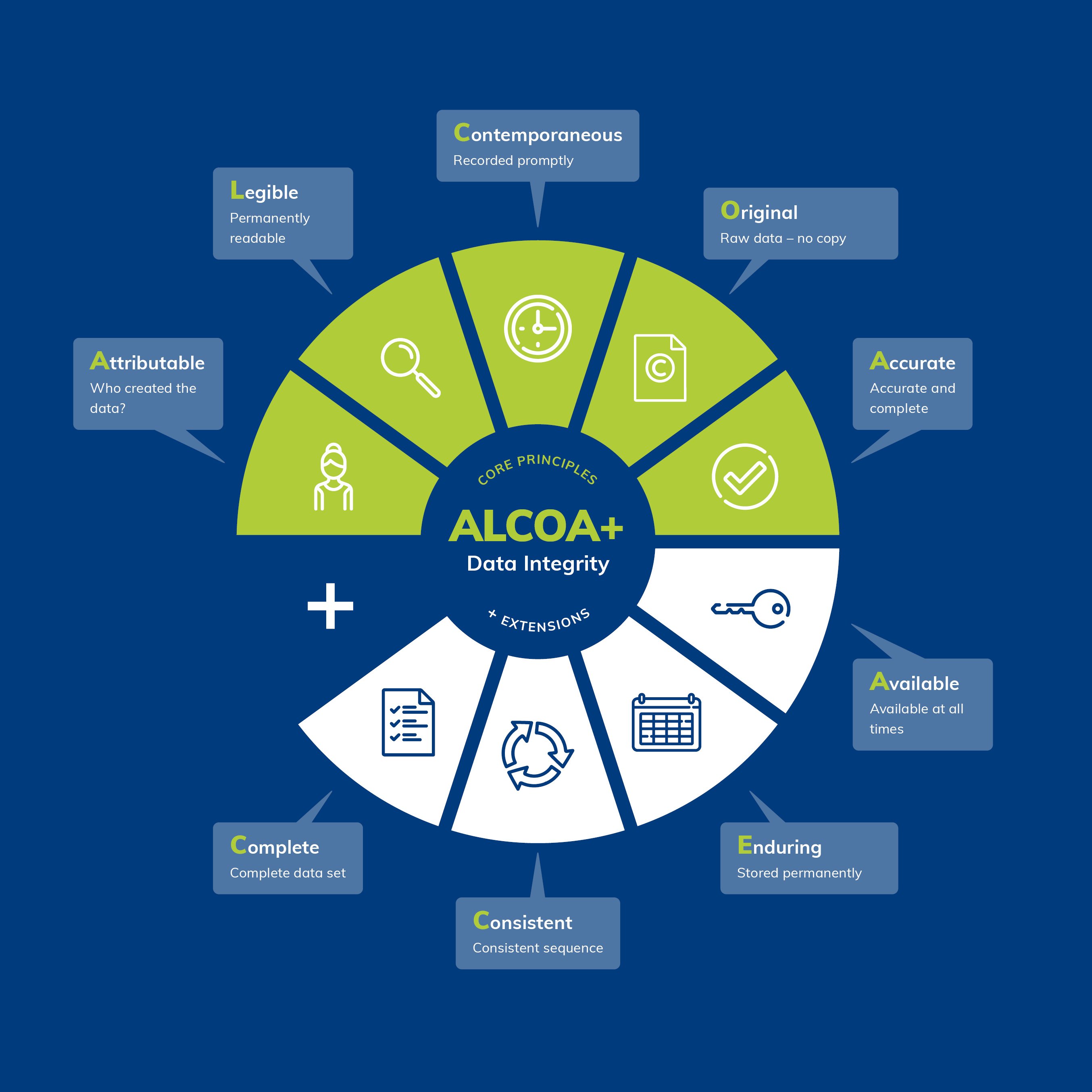
The FDA summarizes these requirements in the so-called ALCOA+ principle. Data must be:
-
Attributable – every data entry must be traceable to a specific person and time
-
Legible – permanently readable and understandable
-
Contemporaneous – recorded at the time of generation
-
Original – raw data is raw data, not a subsequent reconstruction
-
Accurate – correct and free of unwarranted corrections
This is supplemented by Complete, Consistent, Enduring, and Available. These principles are not merely academic. They are the standard by which inspectors evaluate systems and processes.
For computer-based systems, 21 CFR Part 11 (U.S.) and Annex 11 of the EU GMP Guidelines (Europe) also apply. Both require, among other things: audit trails, access controls, system validation, and a traceable data history.
Why Excel Fails Structurally in This Context
Excel wasn't designed for regulated environments. It was designed for flexibility—and that flexibility is precisely the problem.
No robust audit trail
Excel does not have native, tamper-proof change tracking. When a cell is overwritten, no trace is left behind. The built-in “Track Changes” feature is optional, can be disabled, and does not meet the requirements for a GxP-compliant audit trail. Excel lacks robust audit trail functionality, making it difficult to track who made which changes and when—yet this is a core requirement in GxP environments for demonstrating data integrity and compliance.
Inadequate access controls
Cell protection and sheet protection in Excel are not security measures. They can be removed in just a few steps. Role-based access control, as required by Annex 11 and 21 CFR Part 11, cannot be implemented in Excel.
Not validatable in the GxP sense
It is possible to validate an Excel worksheet—but the process is time-consuming, error-prone, and only sustainable to a limited extent. Every change to the worksheet requires revalidation. Most CSV and QA teams consider spreadsheet software difficult or even impossible to validate—and for good reason, as this is directly related to the inherent characteristics of these tools.
Lack of data centralization
Excel files are often stored locally on individual computers or on network drives, which makes centralized data management difficult—even though consistent data management and accessibility are essential in GxP environments. Who has the latest version? Who has a copy on their desktop? These questions should not remain unanswered in regulated processes.
Formal Logic Without Control
Unvalidated cell formulas can lead to incorrect calculations—including incorrect logarithmic reductions and percentages—which call into question the validity of all the data derived from them. Formulas can be overwritten, moved, or altered via drag-and-drop without anyone noticing.
The Hidden Risk: Metadata in File Names
One topic that is too rarely addressed explicitly in GxP discussions is the issue of metadata. Metadata describes the context of data: Who generated it and when? To which experiment, batch, or study does it belong? Which version is valid?
In Excel-dominated lab environments, this information is often stored in a place not intended for that purpose: the file name.
File names like Stability_Batch_2023_v3_FINAL_new_JM_checked.xlsx are not the exception—they are the rule. What appears functional at first glance is, upon closer inspection, a serious structural problem:
File names are not subject to any formatting guidelines. There is no enforced structure, no controlled vocabulary list, and no required fields. Two people in the same lab will name the same content differently.
File names have limitations. Operating systems restrict their length. Special characters cause errors. What starts out as a metadata system in a project collapses under its own inconsistencies once it reaches 200 files, if not sooner.
File names cannot be searched as structured data. A search for “all stability samples from Q2 2023 for active ingredient X, batch Y, validated by person Z” is not possible in a file system—at least not reliably.
File names are not versioned. “v3_FINAL_new” is not version control. It is a warning sign.
What is missing is a structured, mandatory metadata layer—fields that must be filled out when creating a record, that can be searched, filtered, and analyzed, and that remain permanently linked to the data. This is not a matter of employee discipline. It is a matter of system architecture. Excel does not offer this architecture.
What Regulators Say—and What They Do
In recent years, regulatory authorities have made it abundantly clear that uncontrolled spreadsheets are not tolerated in GxP processes.
Recent case studies reveal serious errors: formula errors, missing audit trails, and poor data integrity, which have led to FDA warning letters, rejected marketing applications, and compromised compliance records.
The FDA warning database is full of specific findings. A recurring pattern: original data was initially stored in an “unofficial” and uncontrolled electronic spreadsheet on a shared network drive and only subsequently transferred to an “official” form. In another case, Excel spreadsheets were used to track deviations and CAPA activities without documenting changes with a date, user ID, or justification—and without the ability to track deletions.
The consequences are real: import suspensions, product recalls, and costly remediation programs. And all of this for a tool that was never intended for this purpose in the first place.
For further reading, we recommend the article “Spreadsheets: A Sound Foundation for a Lack of Data Integrity?” in Spectroscopy Online (source), which analyzes these vulnerabilities in detail using actual FDA warning letters.
The bridge between LIMS/ELN and Excel
This is where many discussions end: “Just use a LIMS or an ELN, and the problem is solved.” That’s true—if a LIMS or ELN fully meets the requirements. In practice, that’s often not the case.
LIMS systems are excellent for standardized laboratory processes: sample management, test plans, and result recording against defined specifications. But they reach their limits as soon as processes become highly customized, scientifically complex, or methodologically fluid.
ELNs cover the free documentation of research work. But structured data processes with calculation logic, status workflows, or device integration are not their core strength.
What remains is a gray area: processes that are too complex for a note-taking system but too specific for a standard LIMS. In this gray area, people typically turn to Excel today. And this is precisely where the real problem lies.
The Case for Custom Software Development
When LIMS and ELN aren’t effective and Excel isn’t a viable option, there is a third option that is still too rarely given serious consideration in the laboratory IT environment: custom software development tailored to specific needs.
That sounds like a lot of work. For many teams, rejecting it is a knee-jerk reaction. But upon honest reflection, the reality is often quite different.
What Custom Software Can Do
data platform, or a lean database solution—can be designed to be GxP-compliant from the ground up:
- Audit Trail as an integral part of the system, not as a retrofitted add-on
- Role-based access control with mandatory authentication
- Structured metadata entry as required fields when creating each record—not as a filename
- Versioning of data records and configurations
- Validation in accordance with GAMP 5, featuring a clear system architecture and documented interfaces
- Searchability across all metadata and content
Data Integrity as a Design Principle
The key difference from Excel is not technological, but conceptual. With a custom software solution, data integrity can be established from the outset as a non-negotiable design requirement. Fixing data integrity issues after the fact is expensive, time-consuming, and disruptive—companies that fail to establish robust controls from the outset risk regulatory penalties, product recalls, and reputational damage, which are far more costly than a clean initial implementation.
This applies to custom software just as much as to commercial systems—but the difference is: With custom software, these requirements can shape the architecture from the start, rather than being configured into a generic system after the fact.
Sustainability: Focus on maintainability and operation
One argument often raised against custom development is long-term maintainability. Who will take care of it in three years? What happens if the developer leaves the company?
These questions are valid—but they are even more acute when it comes to Excel. A nested Excel workbook with 15 worksheets, VBA macros, and undocumented dependencies is, in practice, harder to maintain than a cleanly documented, modular application with versioned source code in a repository.
Sustainable custom software development means:
- Dokumentation as part of the delivery, not as an afterthought
- Modular architecture that allows for extensions without destabilizing the overall system
- Standardized technologies instead of proprietary solutions that are tied to specific individuals or tools
- Operational concept with defined update, backup, and disaster recovery processes
An Excel file stored on a network drive lacks an operational framework. A professionally developed laboratory application can and should have one—including SLA definitions, monitoring, and a clear escalation process.
The cost comparison that is rarely done
The direct development costs of a custom solution are transparent. The costs of using Excel are not—until it’s too late. An FDA inspection that identifies data integrity issues can lead to production stoppages, product recalls, and months-long remediation projects. Significant time and financial losses occur when batches must be held or retested—and commitments to distributors as well as the company’s reputation are jeopardized.
In contrast, a properly developed, validated software system—even if it costs more initially—is an investment in process reliability, inspection readiness, and the trust of regulatory authorities and partners.
When Individual Development Is the Right Choice
As a general guideline: Custom software development is particularly useful when....
- a process is too specific for a standard LIMS or ELN
- metadata must be structured, enforced, and searchable
- the calculation logic must be complex and auditable
- Interfaces to devices or other systems are available
- the process should be maintained and further developed over the long term
- GxP validation in accordance with GAMP 5 is required, and the system must be designed for this purpose
Custom development is not a panacea—it requires a thorough requirements analysis, a clear validation strategy, and a reliable development and operations partner. But in many cases, it is the only solution that effectively addresses compliance, quality, and longevity.
Conclusion
Every time a new Excel file is created for a critical process in a GxP laboratory, a decision is made. Most often unconsciously, out of pragmatism. But from a regulatory and quality perspective, it is a decision with consequences.
Any computer-based system used in GxP-relevant environments for the collection, recording, transmission, storage, or processing of data must be validated—and the risks that the system and its users pose to data integrity must be identified. Excel is no exception. The difference is: With a properly developed, dedicated system, these risks are manageable. With Excel, they are not, by design.
The goal is not a lab without tools for rapid analysis. Excel remains valuable for exploratory evaluations, visualizations, and internal calculations that are not GxP-relevant. But for processes that require data integrity, traceability, and audit-proofing, you need systems built specifically for that purpose.
Sometimes that’s a LIMS. Sometimes an ELN. And sometimes—more often than you might think—it’s a custom solution that does exactly what’s needed. No more. But also no less.
Are you facing a similar situation in your lab? A process that falls between LIMS and ELN—and is currently being managed using Excel, even though you know that’s not a long-term solution?
We support lab IT teams, quality managers, and researchers in systematically closing such gaps: from requirements gathering and validation strategy to technical implementation and ongoing operation.
Get in touch—for a no-obligation initial consultation, an assessment of your current situation, or a discussion about the right solution for your specific environment.