

According to Microsoft, the Power Platform is a comprehensive end-to-end cloud automation platform based on low code and AI that is designed to automate and optimize business processes. The platform currently consists of five main components: Power BI, Power Apps, Power Automate, Power Virtual Agents, and Power Pages.
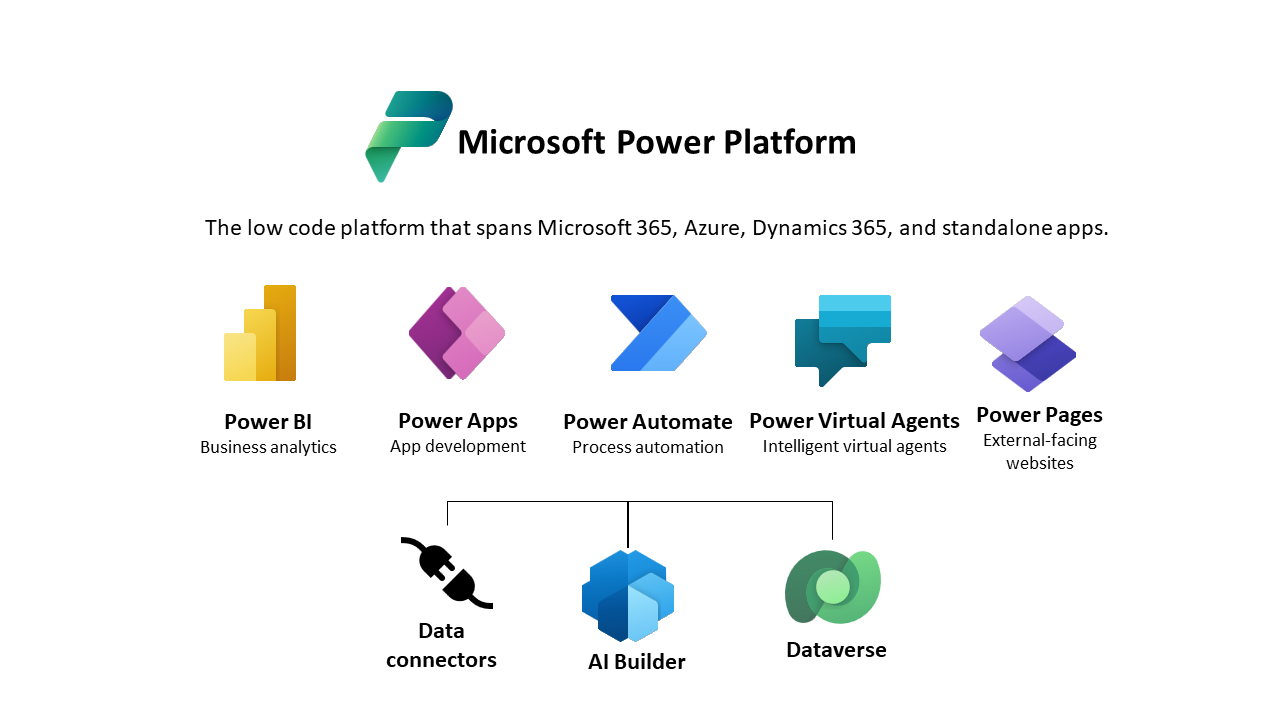
The promise is greater security, control, simplified administration, and easy automation and document management. (Source: Microsoft)
But is it really that simple? As a company that develops custom software, we are probably not entirely unbiased when it comes to this question. Nevertheless, we have taken a close look at the issue, especially since our solutions and projects are always based on Microsoft technology.
Advantages of the Microsoft Power Platform
User-friendliness
One major advantage is its user-friendliness. Microsoft tools are designed so that they can also be used by users who do not have extensive programming knowledge. – That is the goal! – This allows business-oriented applications to be created quickly and processes to be automated. Microsoft thus offers a low-threshold opportunity to optimize processes quickly and cost-effectively.
Speed
By using low-code or even no-code development tools, applications and automations can be created and implemented quickly (we have already described this in more detail in our article on no-code/low-code LINK). This enables companies to respond agilely to changing requirements and deliver new solutions quickly.
Integration with other Microsoft products
The Microsoft Power Platform is seamlessly integrated with other Microsoft products such as Office 365, Dynamics 365, and Azure. This facilitates the integration of data and processes between different systems and applications, which can increase efficiency and improve collaboration.
Wide range of use cases
With the various components of the Power Platform, companies can cover a wide range of use cases, from data visualization and business process automation to chatbot development. This versatility makes Microsoft Power Platform an attractive solution for companies of all sizes and across a variety of industries.
However, in our opinion, the type of business processes that should be automated with the platform is limited. This is because Microsoft Power Platform also has some disadvantages, which is why it should not be used for business-critical applications.
Disadvantages of the Microsoft Power Platform
Limited customization options
Although Microsoft Power Platform offers a wide range of features, some companies may find that their specific customization requirements are not fully supported. In such cases, it may be necessary to resort to more traditional development methods to create tailor-made solutions. The Power Platform is therefore not a panacea for the digitization and automation of all processes in a company. Furthermore, it is not easily possible to integrate external parties such as suppliers, as they also require a Microsoft license to use the application. Another limitation is that Microsoft Power Platform is intended as a backend. For a user-friendly frontend, other tools such as SharePoint lists or Microsoft Forms must be used. Integrating external systems is also very inconvenient and complex.
Dependencies on Microsoft
The dependence on Microsoft should not be underestimated. Companies that use this platform are dependent on Microsoft's strategy and roadmap. Changes in the direction or support of the platform on the part of Microsoft could affect companies' long-term planning and investments. So if I, as a company, have developed an application at this point in time, it may work. But as soon as Microsoft changes anything (and this happens constantly and without notice), I have to adapt my solution and retest it, and in some cases even redevelop my entire application. This is because Microsoft applications are very dynamic today and are constantly being developed and rebuilt, and Power Platform applications are not backward compatible.
Costs
Although Microsoft Power Platform is an attractive solution for companies that want to quickly create custom applications, the costs of long-term use can be considerable. Licensing, especially for advanced features and larger user numbers, can lead to significant expenses. Just because my current version, which I use to create my business application, is free, there is no guarantee that this will continue to be the case in the future: with licensing adjustments on the part of Microsoft, the inexpensive solution can suddenly become extremely expensive.
Security concerns
Since Microsoft Power Platform is based on cloud technology, security concerns may arise, especially in industries with strict data protection and compliance requirements. Companies must ensure that appropriate security measures are in place to guarantee the confidentiality and integrity of their data. The authorization concept is also very complex and must be understood.
Speed
The applications developed with the platform depend on the performance and service speed of the Microsoft Cloud. In our experience, this is below average and, unfortunately, also unstable and fluctuates.
That's why Microsoft Power Platform is not suitable for business-critical applications
Even though Microsoft offers a powerful suite with its platform, we believe that its use cases are limited and that it should not be used for business-critical or highly complex processes.
Due to the disadvantages mentioned above, it is clear that as a user of the platform, I have no guarantee that my application will continue to work free of charge in the future, or that it will work at all. One of the problems here is that, as a user, I cannot simply adjust the code if I encounter functional difficulties. Since this is a no-code platform, in such cases you have to set up the entire application from scratch and click your way through an interface that is, unfortunately, not particularly appealing. Reliability is therefore by no means guaranteed in this context.
We also believe that the argument that the platform is free and therefore saves enormous costs is incorrect. As already mentioned, this will not necessarily be the case in the future. It should also be noted that in-house personnel with the relevant expertise must be available to create and maintain the applications. The time factor should therefore be taken into account. When using the Power Platform, testing the functionality of the application is also shifted to in-house, which leads to additional work for employees and can cause frustration.
Conclusion
The Microsoft Power Platform offers a low-threshold option for automating business processes and accessing data quickly and cost-effectively via various interfaces. Smaller workflows can also be mapped effectively. Processes such as document management or invoice approvals can be mapped well here. The platform is particularly suitable for smaller companies that do not have a DMS or workflow system, for example. However, business-critical processes that must be highly available and functional should not be created with the platform, but should be placed in professional hands. The applications that can be created are also not suitable for larger companies with more than 50 employees or even multiple locations. In this case, it is more advisable to rely on software, whether off-the-shelf or customized. Although this involves one-time acquisition costs with possible adaptation or expansion costs, it offers reliable functionality.